Features
Voice Cloning: Your Voice for Jingles, Announcements and Podcasts
Tunio now clones your voice: upload a short sample, prove it is yours, and your jingles, announcements and podcasts speak in your own voice. How upload and verification work.
Voice Cloning: Jingles, Announcements and Podcasts in Your Own Voice
Tunio's catalog has long offered dozens of AI voices in many languages — they read jingles, announcements, the weather forecast and the time. But a station, a café or a gym has one voice listeners recognise better than any announcer: the owner's, the host's, the front-desk manager's. Now you can bring it into Tunio. Voice cloning works like this: you upload a short speech sample, confirm the voice really is yours — and a couple of minutes later it shows up in the voice list next to the catalog ones.
Why a radio station or a business needs its own voice
- Recognition. A jingle in the host's voice or a greeting in the owner's voice lands harder than any "neutral" voiceover — the listener knows a specific person is talking to them.
- No studio, no microphone for every spot. Record the sample once; from then on, promos, opening hours and event announcements are voiced from text in seconds.
- One voice across the whole chain. For a retail or salon network, your own voice becomes part of the audio brand: the same familiar timbre everywhere.
- Any language. The clone speaks whatever language the text is written in — the same voice can read an announcement in English, Spanish or Kazakh.
How to upload your voice
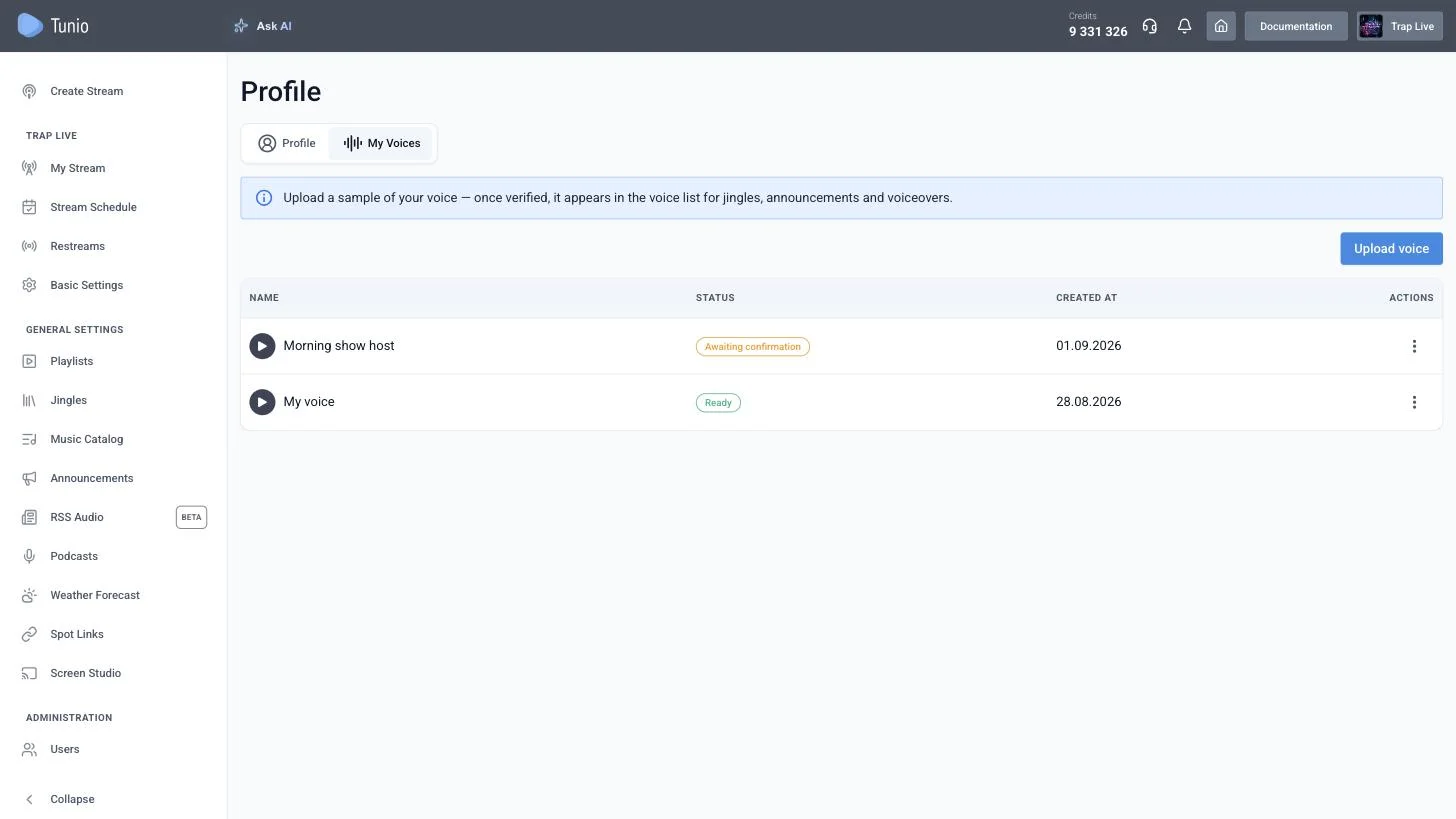
Open Profile → the "My Voices" tab and click "Upload voice". The tab appears in your profile when the feature is included in your plan. The upload wizard has three steps.
Step 1. Terms of use
Before uploading anything you confirm three points: that this is your voice (or you have the owner's explicit consent to clone it), that you will not use the generated content to deceive or impersonate other people, and that you agree to the processing and storage of the sample for speech synthesis. Without all three boxes ticked, "Continue" stays disabled — this is a deliberate decision, not a formality.
Step 2. Upload a sample
Three fields here:
- Voice name — the label you'll see in voice pickers, e.g. "Marina's voice" or "Morning show host".
- Audio file — 5–90 seconds of clean speech with no music or noise. A phone recording, a voice message or a dictaphone clip in any common format will do: MP3, M4A, WAV, WebM. The clone comes out best from 10–30 seconds of calm, intelligible speech.
- Sample transcript — word for word what is said in the file. It isn't there for verification; the model itself needs it: it aligns the sound with the text and that is how it "learns" exactly how you pronounce things.
A few tips for a good clone: record in a quiet room, keep the microphone at a constant distance, and speak at the pace and with the intonation you want to hear on air. You don't have to cut pauses or "umms", but speech recorded in a car or on the street will noticeably degrade the result.
Step 3. Voice confirmation
The most important step. A random short phrase appears on screen — two or three simple sentences about something everyday, 14–20 words — and a timer of roughly 45 seconds starts. Press "Record", read the phrase aloud into your microphone, press "Stop", listen back if you like, and send it with "Submit for review". Don't like the phrase or ran out of time? "Another phrase" gives you a new one.
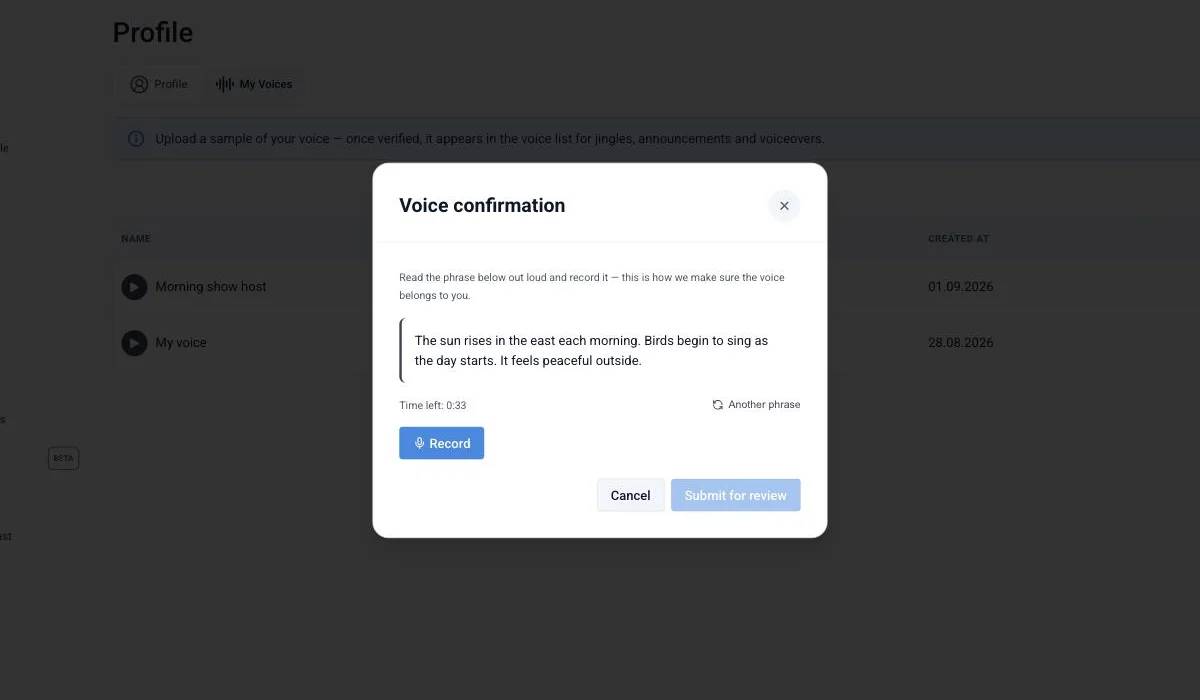
If you close the window after step two, the voice isn't lost — it stays in the list with the status "Awaiting confirmation". You can come back to the recording at any time via the actions menu → "Confirm voice".
How verification works
After submission the voice gets the status "In review", then "Verifying" — and usually a couple of minutes later becomes "Ready". The page refreshes on its own; no reload needed.
Under the hood the check has two independent parts:
- Text match. The recording goes through speech recognition and the transcript is compared with the phrase you were given. This is how we make sure a live person read exactly this phrase exactly now.
- Voice match. A voice "fingerprint" — a numeric representation of the timbre — is extracted from both the recording and the uploaded sample, and the two are compared. This is how we make sure the person reading the phrase is the same person whose voice is in the sample.
If either part fails, the voice becomes "Rejected", and hovering over the status shows the reason: "The spoken text did not match the phrase" or "The voice in the recording did not match the uploaded sample". A rejection isn't final: via "Confirm voice" you can get a new phrase and record it again, as many times as you need.
Why so strict? Without the voice check, anyone could upload a recording of a famous person and read the phrase themselves. Without a one-shot random phrase on a timer, they could synthesise it in advance with someone else's clone and simply play it back. The two checks together close both scenarios — that is how we protect voice owners and listeners alike.
How it works inside
We don't "train" a separate model for each user — that is slow, expensive and needs hours of recordings. Instead we use zero-shot voice cloning: on every generation the speech synthesis model receives your sample together with its transcript as a reference, and speaks the new text while copying the timbre, manner and pace of that reference. That is why a 10–30-second sample isn't a limitation but a sufficient condition: the model needs cleanliness, not volume.
A few consequences you will notice:
- The clone is ready right after verification — no "training will take a day".
- The voice is language-universal. Catalog voices carry a country flag in the list; yours carries a globe 🌐 — it will read text in any of the dozens of supported languages.
- The play button in the voice list plays your original sample — what you uploaded, not synthesised speech.
- Processing runs on Tunio's own GPU servers. The sample is not handed to third-party voice synthesis services.
Where you can use your voice
A verified voice appears in the voice picker with a "Mine" badge — first, ahead of the catalog voices. Right now it is available:
- In the jingle generator — Jingles → the "Jingle Generator" tab. Write the text, pick your voice and a music bed — and the jingle in your voice is ready.
- In announcements — Announcements → "New announcement". Text, voice and schedule are set in one place; from then on the announcement goes on air between tracks on schedule, read in your voice.
- In podcasts — voice an episode or a regular segment in your own voice and put it on air via the Stream Schedule: an author's podcast with no studio and no microphone.
- Via the API — for integrations and custom voiceover scenarios: a verified voice is returned in the voice list alongside the catalog ones.
An account can hold up to three voices. The voice isn't yours alone: colleagues working in the same content library also see it in the pickers and can voice content with it — just like shared jingles and announcements.
Generating with your own voice is billed exactly like any catalog voice — there is no extra charge for the clone itself.
Privacy and control
A voice sample is biometric data, and we treat it accordingly:
- The sample is stored exactly as long as the voice exists. It is your clone: synthesis is impossible without it, so it can't be deleted "after training" — there was no training.
- One-click deletion. Actions menu → "Remove" erases the voice itself, the confirmation recording and the preview. Note that announcements and schedules that used this voice will stop being voiced by it.
- Consent is recorded. We store which version of the terms you accepted and when — separately for every voice.
- The voice is visible only to your content library. Other Tunio accounts won't see it in the catalog or in the API.
Frequently asked questions
Can I upload someone else's voice — a host or a voice actor, say?
Yes, if you have their explicit consent to clone it — you confirm this in step one. But they are the one who has to pass confirmation: the phrase must be read in the same voice as the sample.
Which languages does the clone speak?
Any of the dozens of supported languages — the model reads the text in whatever language it is written in. The sample itself can be in any language.
What if my voice is rejected?
Hover over the status to see the reason. If the text didn't match, read the whole phrase clearly without skipping words. If the voice didn't match, record in the same conditions as the sample and in the same voice. Then "Confirm voice" → new phrase → new recording.
How long does verification take?
Usually a couple of minutes. The voice list refreshes automatically.
Which plan includes voice cloning?
Plans with custom voices enabled — the "My Voices" tab appears in the profile automatically. If you don't see it, check your plan's terms in the billing section.
Try it on your own stream
Record 20 seconds of speech, confirm the voice — and your next jingle or discount announcement goes on air in your own voice.